 OnePlan
Blog
Group travel: from an overflowing group chat to an easy-going trip

There's a moment almost every friend group has lived through. Someone suddenly drops a photo of a bright blue beach into the group chat with an excited question: “Should we all go to the beach this summer, guys?” A few minutes later, a chat that had been silent for days suddenly comes alive. One person is in for the beach, another votes for the mountains, someone starts sharing a café they just saw on TikTok, and someone else opens a flight app to announce that fares are really cheap right now.
In that moment, the trip feels like it's already within reach. Everyone starts picturing mornings waking up in an unfamiliar city, dinners that run late into the night, group photos and the kind of stories you'll still be telling years from now. But once the first rush of excitement fades, things start to slow down.
“Have we locked the dates yet?”
“Where's that cute hillside place with the big tree someone shared earlier?”
“Can we start the itinerary already?”
“Any chill homestay ideas?”
Traveling in a group is probably one of the most fun things you can do with friends. But before you actually get to sit together on a flight or watch the sunset somewhere far away, the group usually has to survive another, no less grueling journey: the journey of wrestling with the trip plan.
When a group chat just isn't enough for a trip
The problem usually isn't that everyone has different tastes. That difference can even make a trip more interesting. What really turns everything into a mess is that the group is trying to organize a trip with tools that were never built for it.
Group chats are great for talking, but they're not the place to make decisions. A spot someone just shared can vanish under dozens of other messages within minutes. A question about the departure date can be asked over and over, and still nobody is sure which option is final.
Itineraries are the same, they tend to show up in all sorts of forms. The “diligent” one sits there typing notes into a notes app, the “admin” builds a spreadsheet with a thousand Excel formulas, the more easygoing one screenshots a few nice-looking spots and drops them in the chat, and someone else keeps a “TOP 20 PLACES YOU ABSOLUTELY MUST VISIT IN THIS LIFE” list on a map. As the date gets closer, you've got a group of four, each carrying a different imaginary itinerary in their head, nobody backing down, the kind of thing that could honestly start a fight.
Then comes the part where money gets involved. One person books the room, another buys the tickets, someone covers the taxi, someone fronts dinner. While the spending is small, everything looks simple. But after a few days with no notes, the four of you end up playing a round of Who Wants to Be a Millionaire, each with your own question:
“How much was dinner the other night again?”
“Wait, do I still owe anyone anything?”
“Send me the bill, will you?”
“Oh I forgot, the taxi isn't split yet. Can I get 50k off everyone? :)”
Once lines like these start showing up, you've hit the headache zone. Doing the math from memory is error-prone, putting it into a spreadsheet eats your time. Don't remind people and they forget, remind them too much and it gets awkward, and if you don't, you're eating instant noodles next month.
Planning a trip of your own? Save places, build the days and split costs in OnePlan, free to start. Get OnePlan →
What a good group travel app should have
Plenty of apps are marketed as travel companions. But not every app is actually a good fit for a big group. Before you download yet another one, there are five things worth paying attention to.
First is the ability to plan together. Everyone needs to see one shared version and the latest changes, instead of constantly re-sending files or screenshots. Next is the map. When every place sits on the same map, anyone can spot which breakfast spot is near the hotel, and group the sightseeing into the same day as that hillside restaurant so nobody has to travel too far.
A detailed day-by-day itinerary matters too. Not just to know where to go in the morning and what to do in the afternoon, but to help the group picture the rhythm of the trip: which days to pack in a lot, which days to leave a little empty for resting and healing. Then there's expense management. A good app should record who paid how much, who shares each expense, and in the end, who needs to send whom how much.
Finally, a good app should be simple enough for everyone to start using right away. Because no matter how powerful a tool is, it doesn't mean much if only one person in the group knows how to use it.
The common types of travel app
Each app tends to handle one part of the trip really well. So the right choice depends on the problem your group most wants to solve.
Splitwise and Tricount usually come up when a group needs to track spending. Their strength is logging each expense, splitting it among members, and automatically netting it out to a final result. Instead of everyone transferring money back and forth, the app optimizes it down to only the transfers that matter. That said, these are mainly financial tools. You'll still need somewhere else to save places, build the itinerary and manage the shared plan.
Wanderlog is well known for building itineraries and viewing places on a map. Apps in this group are especially handy when you want to arrange attractions by day and picture the route. However, expense management is usually a bonus feature rather than a full cost-splitting system for the whole group.
Some apps like MemoGo or OnePlan Travel choose to combine both planning and expense management. The biggest advantage is that the group doesn't have to jump between too many tools. Ideas, places, itinerary and money can all live inside the same trip.
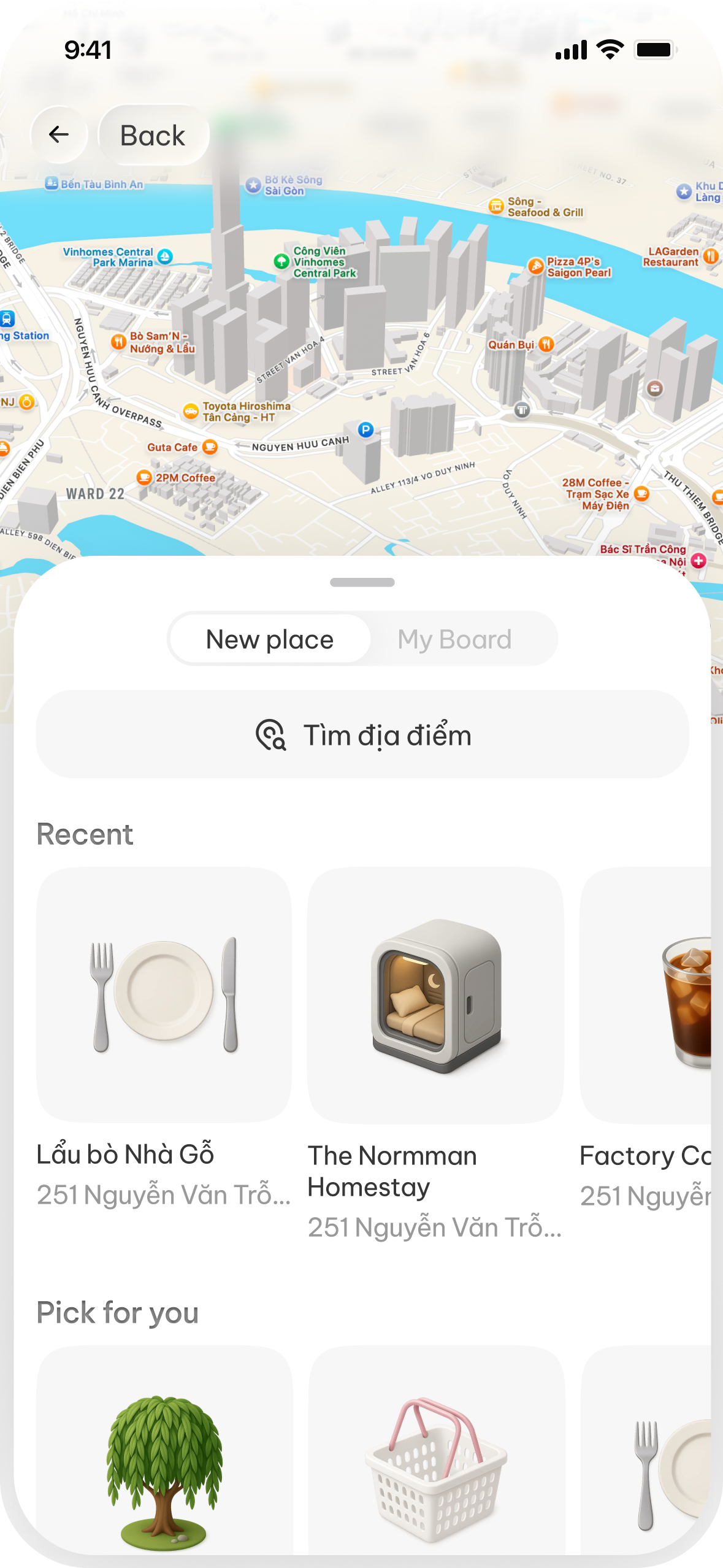
With OnePlan Travel in particular, one of the things that sets it apart is turning the social videos and Reels you've saved into places on the map. Because sometimes the inspiration for a trip doesn't come from a long guide, but from a few seconds of seeing a tiny vintage café, a beautiful hidden check-in corner, or an incredibly tempting dish on TikTok. Instead of saving the video and forgetting it, you can drop the link into the app to recognize the place and pin it straight onto the map.
From an idea in the group chat to a real trip
To keep planning from dragging on forever, the group can start with five fairly simple steps.
First, lock down the three most important things: destination, timing and a rough budget. Nothing has to be exact from the start. A frame like “Da Nang, three days two nights, around five million dong per person” is already enough for the group to start finding suitable options. Without that frame, every idea sounds good but it's very hard to reach a decision.
Next, create one shared place to gather ideas. Everyone in the group tends to find inspiration differently. Someone watches TikTok, someone saves posts on Instagram, someone reads blogs, someone likes hunting for spots on a map, and someone has a list they noted down months ago. Instead of sending it all into the group chat, create a shared collection so everyone can add places, links or videos.
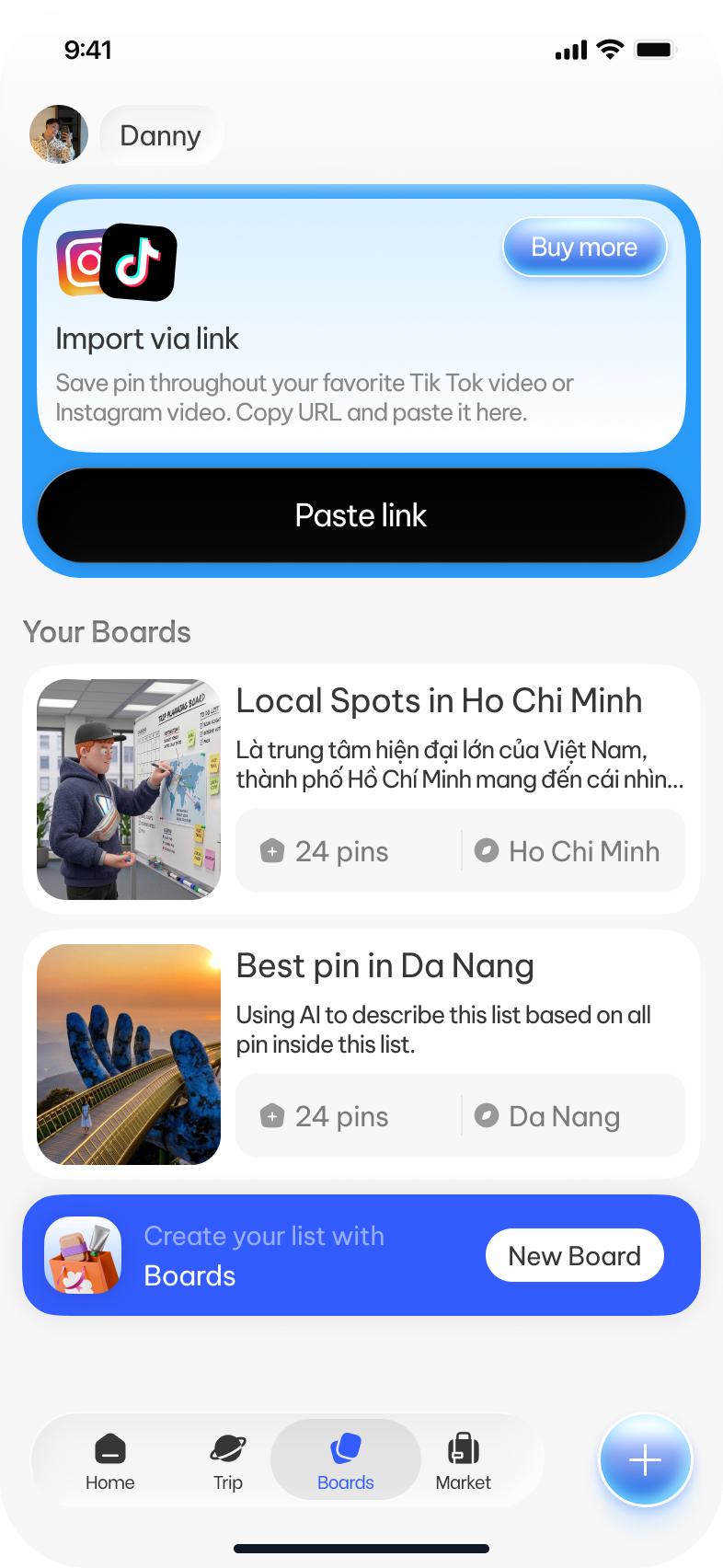
Once you have a list, put every place on the map. This is usually when a long list starts turning into a sensible plan. You might notice three saved restaurants sit right next to each other, while another spot is almost an hour away. Places close together can be grouped into the same day. Places too far out can be skipped, or given their own dedicated outing.
Next, build the itinerary day by day. You can add estimated times, notes about tickets, opening hours or dishes to try. Activities can be dragged and dropped to reorder when needed. For a big group, a fun approach is to pick a “day lead” for each day of the trip. That person doesn't have to become a tour guide, they just need to own the plan for the day they're in charge of.
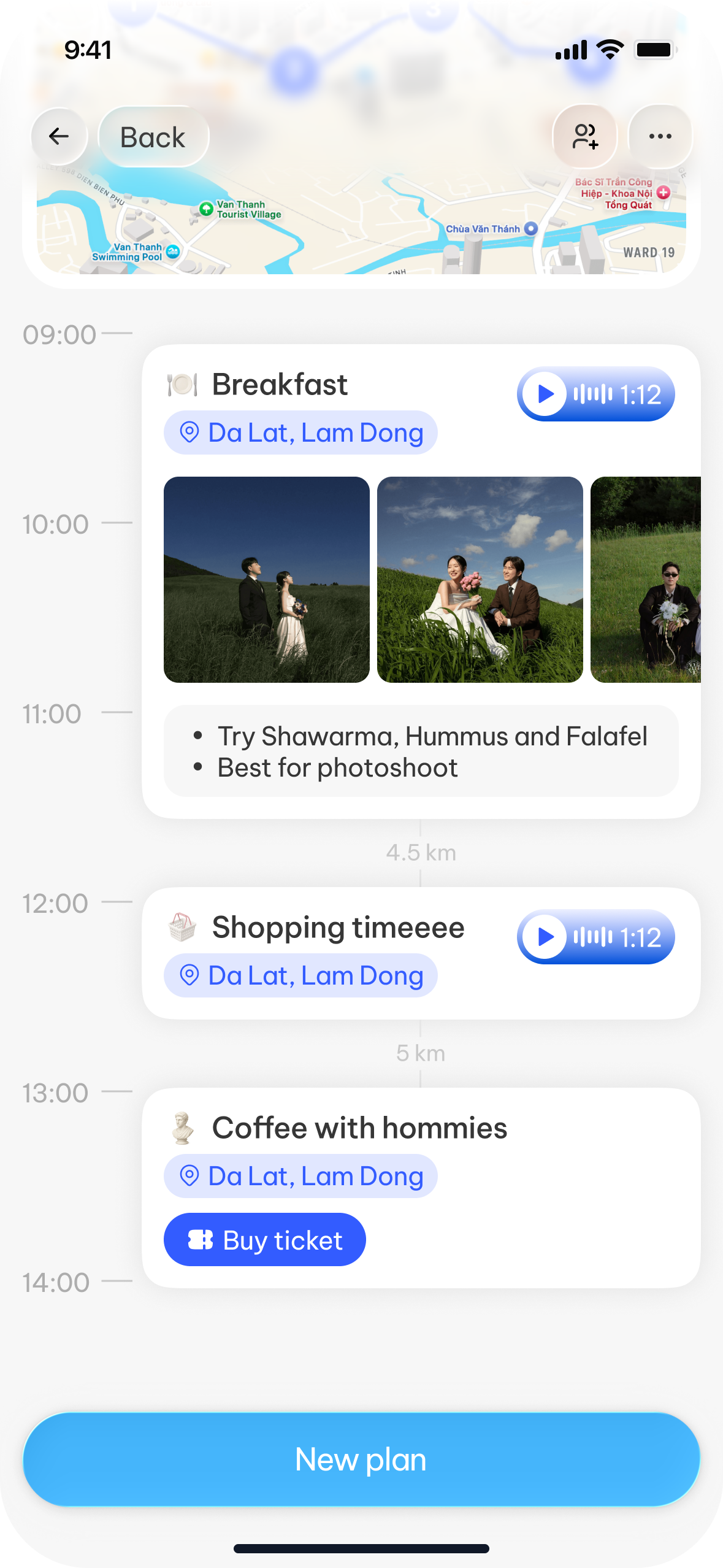
And finally, accept that no itinerary survives intact once the trip begins. The 4:30am cloud-hunting sunrise in Da Lat that nobody can actually wake up for. A restaurant that's suddenly closed because the owner saved up enough to go have fun in Bangkok. Or a sudden downpour nobody could have predicted. So the itinerary should be flexible enough to change right on your phone. When one person updates it, everyone else sees exactly what changed from the original plan.
At this point the itinerary is no longer a checklist you're forced to complete, but more like a compass that helps the group know where they are and where they can go next.
It'll be the last trip together if the money isn't transparent
Money is a small part of the trip, but it can leave a bad taste for a very long time if it isn't handled clearly. And every friend group tends to have its own way of managing it.
The first way is one person fronts everything, then divides it later. This is pretty tidy during the trip, but the person who paid has to remember a lot of expenses and spend time tallying it all up afterward.
The second way is a shared kitty. Each member chips in some money at the start of the trip, then shared meals, transport or tickets are paid out of it. This suits close-knit groups with fairly similar spending levels, but you still need to log the expenses so everyone knows how the kitty was used.
The important thing is to record an expense the moment it happens. Don't wait until evening or the end of the trip, because by then it's very hard to remember exactly who joined which meal or who wasn't in that taxi.
Before the trip, the group should also agree on what gets split evenly and what each person pays on their own. The room, shared transport or group tickets are usually easy to split evenly. Meanwhile, personal drinks, individual shopping or items only a few people use should be kept separate. Once the trip ends, settle up as soon as possible. That's when every expense is still clear, the receipts haven't gone missing and everyone is still buzzing about the trip.
Log expenses and settle up in a snap
This is probably where a group travel app is most useful. Instead of opening a spreadsheet, adding up each column and then messaging each person individually, the app can track every expense throughout the journey.
You just enter the amount and pick who took part. The system works out each person's share, offsets what's already been fronted, and gives you the final result: who gets money back from the group kitty and who needs to chip in more.
OnePlan Travel is built exactly that way. During the trip, the group can keep adding expenses. On the last day, instead of spending a whole evening doing the math, everyone just reviews the items and settles up by tapping the “End Trip” button.
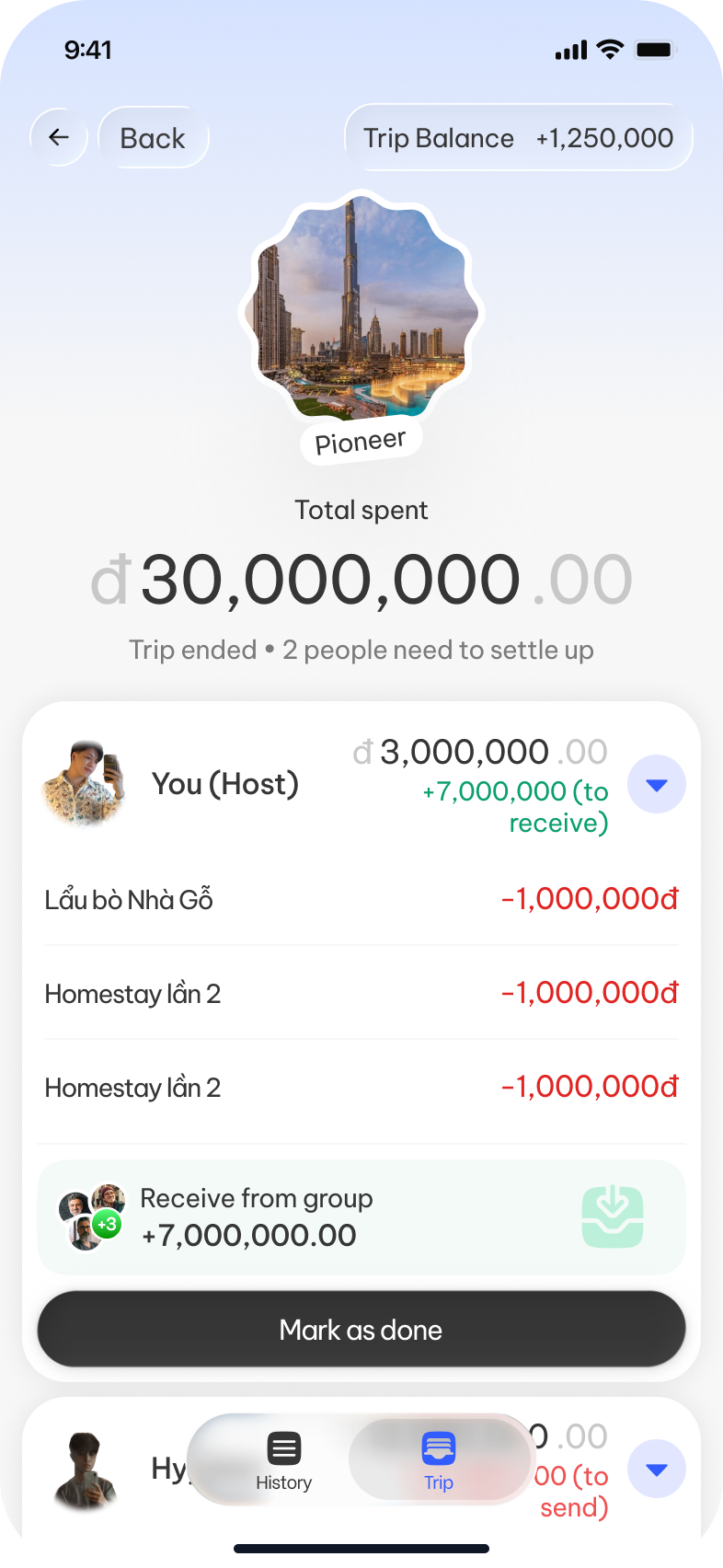
This is the moment everyone in the group is most nervous about, when each person finds out exactly how much they spent and on what. Try not to be too shocked at the final number, ha. The money is sorted out clearly, and what's left should be a proper night out, or even the start of planning the next trip.
OnePlan Travel brings the whole trip into one place
OnePlan Travel is made for the journey of a group trip, from the first moment the group finds a place they want to go, to the moment the last bill is settled.
You can save places from social videos or Reels with OnePlan Travel; the app recognizes most of the cafés and spots mentioned in the video, then looks them up on the map. Every place the group has saved appears in one single space, making it easy to picture the trip and arrange places by area.
Places can also be organized into separate collections by city, or saved to match each person's own style. Once you've chosen where to go, the group can build the day-by-day itinerary together, adding times, notes and live updates whenever the plan changes.
Throughout the trip, OnePlan Travel keeps helping you log expenses, track who paid, and automatically calculate the split at the end. After the trip is over, the Passport in the app keeps a record of everywhere you've set foot, like a little diary written in cities, places and memories.
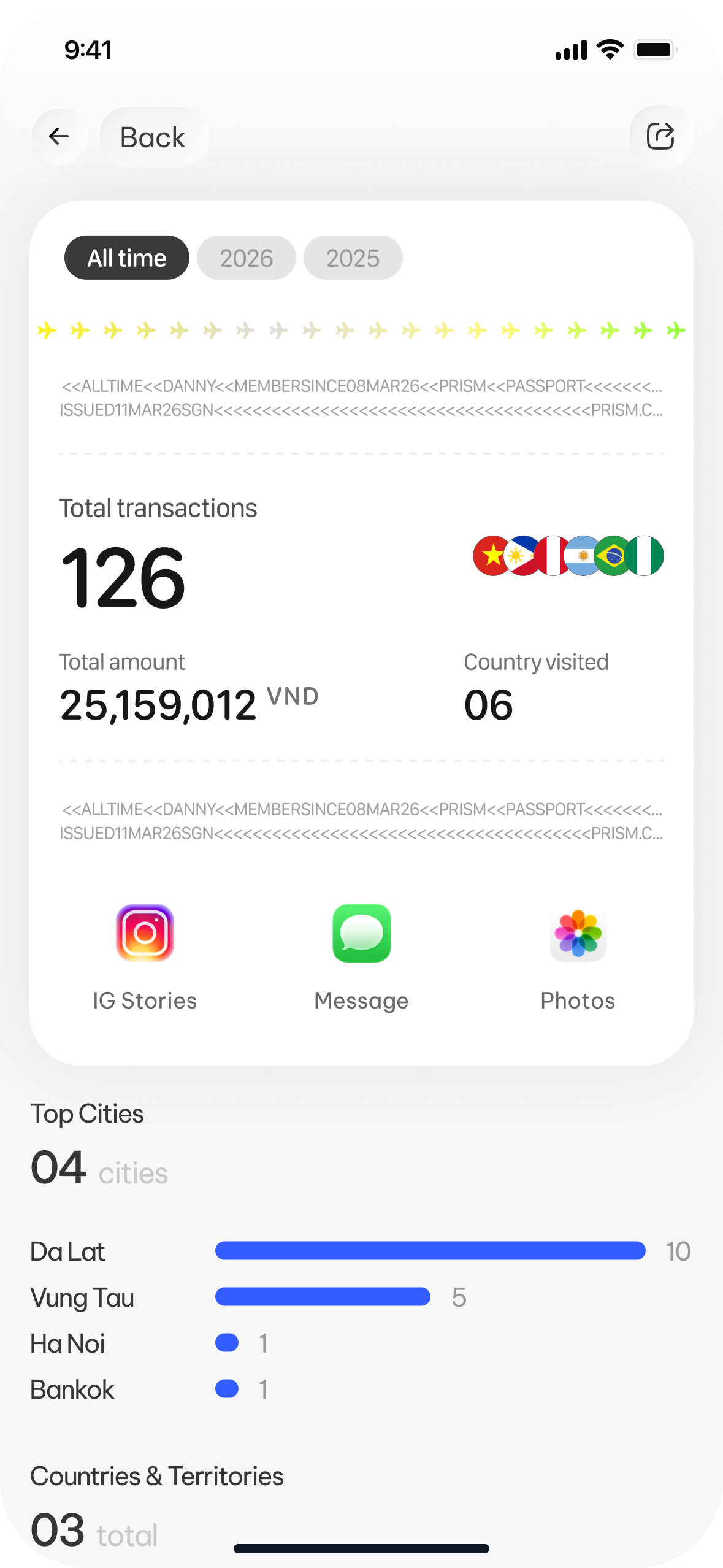
Convenient and friendly to use
A group trip will always have differing opinions, last-minute changes of plan, and sometimes a few debates over what to eat tonight. Maybe that's part of what makes the trip memorable.
But those fun parts don't have to come with a chaotic group chat, a dozen different itineraries and an expense spreadsheet so long nobody wants to open it. When ideas, the map, the itinerary and the costs all sit in one place, the group can spend less time organizing and more time actually enjoying the trip.
OnePlan Travel is free to start on iOS today. An Android version is in the works and will be out soon. One small tip: the Basic plan of OnePlan Travel already comes with the full toolkit to manage your trip comfortably. The Pro plan is a better fit for members who want tighter control over the group's spending limits, and who'd like to use the extra AI tools too.
On behalf of everyone at OnePlan Travel,
Danny.